INTERNAL / DRAFTTicketing Admin·Engineering & support
Ticket assignment to GitLab: administrator procedure
Goal
After assigning a customer ticket to a suitable employee in the Ticketing Admin Portal, verify that the backend successfully created the engineering work item in the correct GitLab project.
Pre-flight checks
- Customer has an active account and the correct product entitlement.
- Product/version/release values are complete and correspond to the reported issue.
- Product is mapped to an existing GitLab project the integration identity can access.
- Assigned employee has a valid GitLab identity and appropriate project membership.
- Integration service has a valid PAT with the required API permissions, stored securely and not exposed to ordinary staff.
Procedure
- Open the support ticket from Tickets → View and check title, details, priority and product metadata.
- Use the portal's current assignment control to select the intended employee. The screenshot does not expose that control; verify its position in your deployment.
- Save and confirm assignment persisted in the ticketing application.
- In GitLab, open Projects → Product Team / Unlsh Core → Work items for the sample UnlshCore mapping, or the actual mapped project for other products.
- Search for
[TKT-####]and open the matching item. - Compare ticket number, category, customer, product/version/release, priority and engineer.
- If the entry is absent or incorrect, open the incident/troubleshooting runbook; do not silently assume the sync succeeded.
- Keep customer comments and closure in the customer support portal. Update GitLab separately as needed.
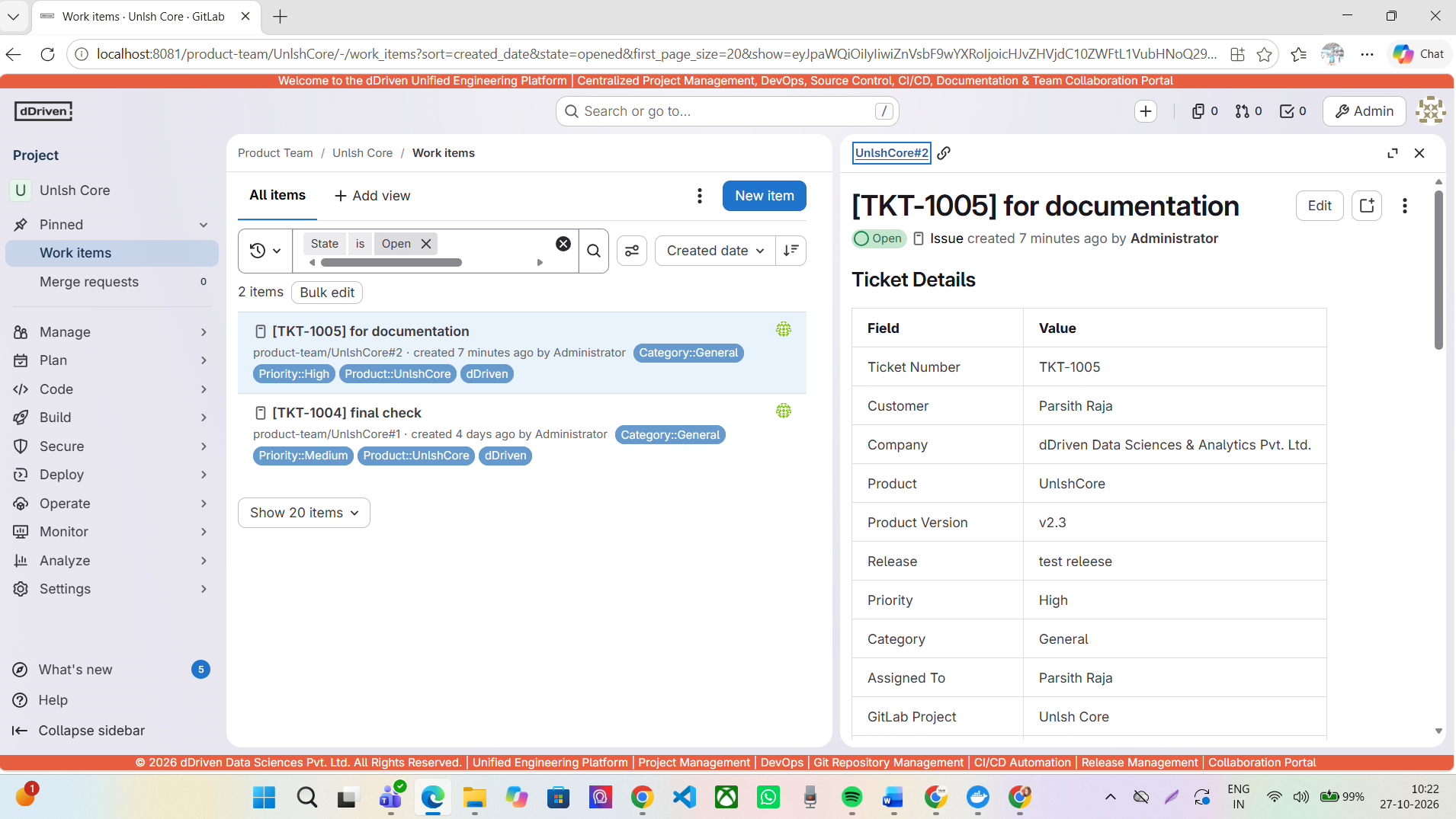
Figure: Verified TKT-1005 assignment-to-GitLab result in Product Team / Unlsh Core. Screenshot captured 27 October 2026; internal use only.
Example data illustrated in the platform walkthrough
| Ticket | Product | Version | Priority | GitLab destination |
|---|---|---|---|---|
TKT-1005 |
UnlshCore | v2.3 | High | Product Team / Unlsh Core |
These values are an illustrative captured case, not defaults or hard-coded settings for new tickets.
Failure handling
- No new item: inspect backend API response and logs, PAT expiration/scopes, project identifier and service connectivity.
- Wrong target: correct product-to-project mapping; do not move production issues without change approval.
- Wrong assignee: inspect employee-to-GitLab identity mapping and membership.
- Repeated assignment: check for duplicate entries and verify idempotency with the application owner.
See Integration architecture and Troubleshooting.