INTERNAL / DRAFTFoundation·Engineering & support
Platform overview and end-to-end lifecycle
1. Components and ownership
| System | Purpose | Who normally uses it |
|---|---|---|
| GitLab Community Edition | Private projects, source code, issues/work items, merge requests and membership | Engineers and GitLab administrators |
| Customer Support Portal | Customer login, owned ticket list, conversation, attachments, closure/reopen and permitted download functions | Authorized customers |
| Ticketing Admin Portal | Ticket triage, internal users, customers, product catalog and secure patches | Approved support staff and ticketing administrators |
| Notification mail system | Event messages to internal teams and customers | Both groups, dependent on configuration |
| Backend GitLab integration | Attempts to create project work items following assignment | Service identity/PAT controlled by operations |
2. Lifecycle, with ownership boundaries
- Onboard: establish the correct GitLab project and internal identities; create active employees and customer records; grant customers only permitted products.
- Report: customer describes an issue, identifies a product and tracks the assigned ticket number (for example
TKT-1005). - Triage: support verifies customer entitlement and captures sufficient reproduction detail, including product, version and release.
- Assign: support selects an appropriate employee and records the assignment in the Ticketing Admin Portal.
- Handoff: the integration backend attempts to create a work item in the GitLab project associated with the product. Do not assume success without verification.
- Investigate: the assigned engineer reads the GitLab issue, works in a branch and requests review for a fix.
- Respond: support communicates with the customer in the customer ticket conversation and makes an authorized patch available through the approved mechanism.
- Validate and close: the customer or authorized workflow closes the ticket after confirming the resolution. Reopening is available in the demonstrated closed-ticket view.
- Reconcile: support/engineering verifies the linked GitLab item separately. Two-way sync is not evidenced.
3. Example: TKT-1005
The team example uses a customer ticket for UnlshCore, product version v2.3, a test release, with High priority. Following support assignment, the linked GitLab work item is visible in Product Team / Unlsh Core; the issue description records customer and product metadata. This shows a successful one-way assignment-to-issue creation example, not a global service-level guarantee.
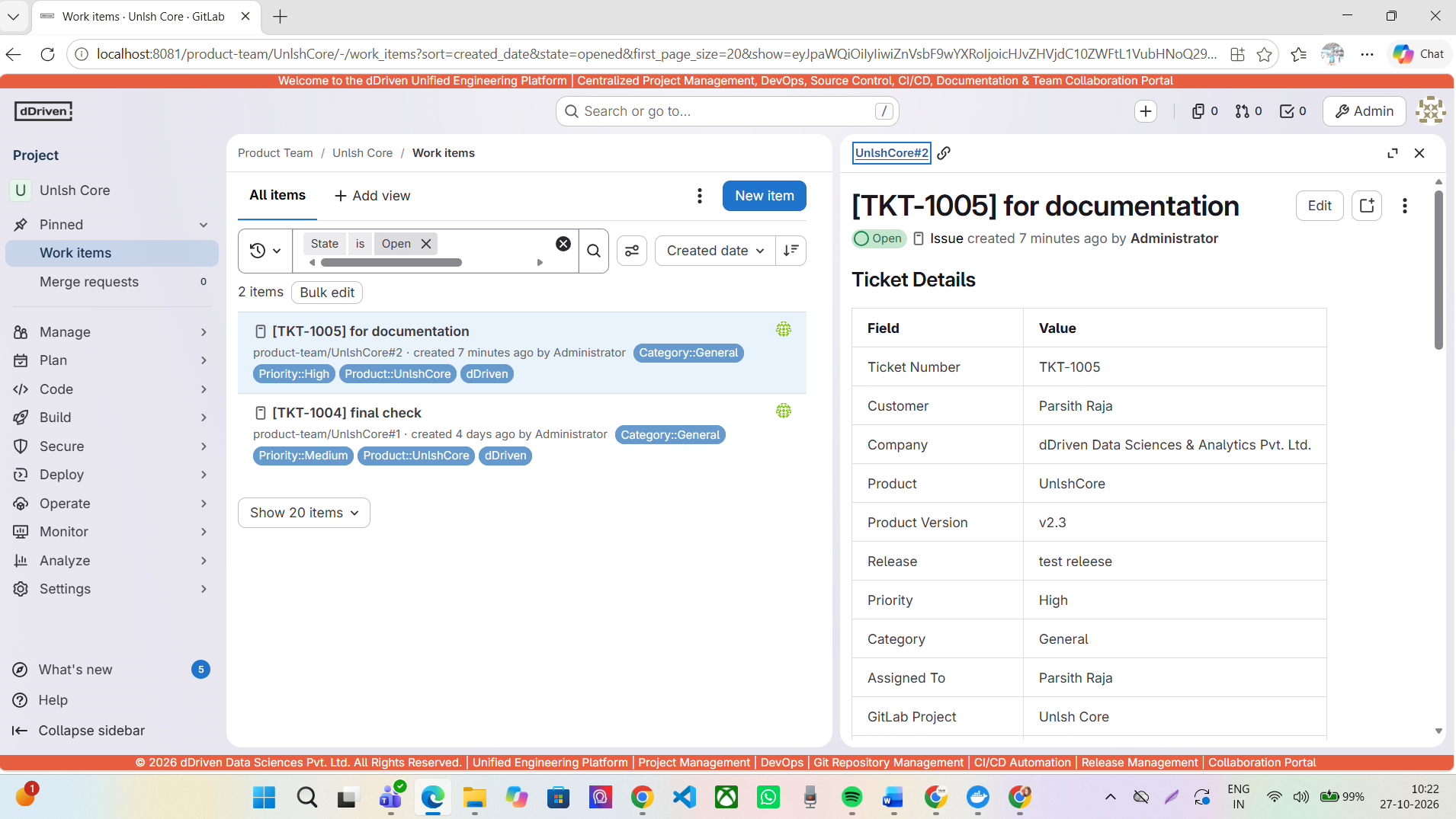
Figure: GitLab work item [TKT-1005] created in the product-mapped project. Screenshot captured 27 October 2026; internal use only.
4. What is intentionally not assumed
- Actual production domain names, authentication provider, hosting topology, network controls, support SLA or on-call contacts.
- A guaranteed callback from GitLab that closes a ticket, or a customer closure that automatically closes GitLab.
- Whether a second assignment creates another issue, or whether updates to existing tickets are synchronized.
- Full feature-request processing and release approvals; screenshots show navigation but not the complete flows.