Customer Portal: ticket history and support replies
Review a ticket
The ticket history screen displays the ticket identifier, product/version/release, status, chronological conversation and reply area. The demonstration shows ticket TKT-1005, a support response and an assigned employee.
- From My Tickets or Ticket History, open the relevant ticket.
- Confirm you are in the correct record by checking ticket number and issue title.
- Read messages in chronological order and look for specific questions or fix instructions.
- Use the reply box to provide requested details. Keep sensitive passwords, API keys and access tokens out of replies.
- Ask for clarification if a proposed action could affect data, configuration or production availability.
- After an approved fix is supplied, test it in the intended environment and report the outcome in the same ticket.
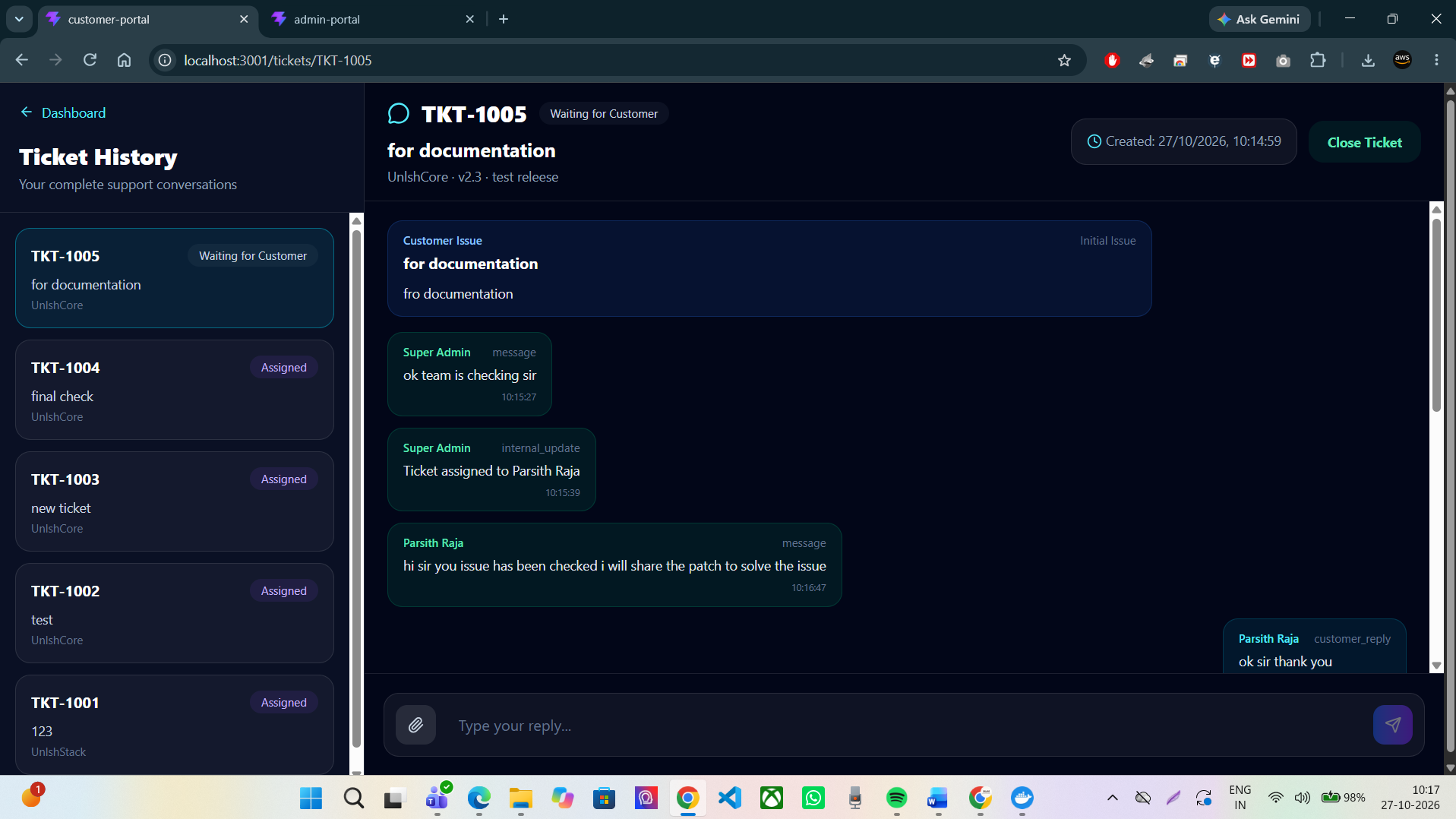
Figure: TKT-1005 ticket history and conversation with support responses. Screenshot captured 27 October 2026; internal use only.
Support agent writing guidance
Use short, action-oriented replies: summarize the symptom, state what is being investigated, ask for precise diagnostic data, and record the next step. Do not promise delivery dates or state that GitLab assignment succeeded unless the work item has been verified.
Record separation
Internal engineering analysis belongs in the authorized GitLab work item or support notes. Customer-visible responses belong in the ticket conversation; copy only information approved for customer disclosure.